
Free disk cleaner for macOS
See what fills your Mac.
Know what cleaning does.
Ferah finds what takes space on your disk, tells you for every item what happens if you remove it, and cleans only what you pick, after you have seen the exact list. Everything goes to the Trash.
Ferah is a Mac app. Open this page on your Mac to download it.
macOS 14 Sonoma or later · Apple Silicon and Intel · Notarized by Apple

- No account
- No tracking
- Trash only, never permanent
- Every item re-checked before it moves
- Notarized by Apple
Why Ferah
Your Mac says the disk is almost full. Now what?
macOS shows a grey bar called “System Data” and leaves the rest to guesswork. That is where most people get stuck.
“System Data” explains nothing
Tens of gigabytes without a name. Storage settings don't say what it is or whether it is safe to remove.
Cleaner apps sell fear
Big red numbers, a “clean everything” button and a subscription at the end. You still don't know what was deleted.
Deleting by hand is risky
A command copied from a forum or the wrong folder in Finder can break a project or an app.
Ferah does the opposite: it names every item, says what removing it does, and leaves the decision to you.
Who it's for
For anyone whose Mac is running out of space.
Whether you code all day, build apps by chatting with AI or just want room for your photos, Ferah speaks your language.
Vibe coders
You build with AI. Your disk fills up anyway.
Cursor, Claude Code and Lovable make new projects in minutes. Each one leaves node_modules, build caches, Docker images and AI models behind, in folders you have never opened.
Ferah finds
- node_modules of old projects
- .next and Vite caches
- Docker images and build cache
- Ollama and Hugging Face models
- Cursor and VS Code data
Ferah checks every project before suggesting anything and never touches your source code.
Developers
You know it's cache. Finding all of it takes an afternoon.
DerivedData, simulators, Gradle, Unity Library, Docker.raw: you know they rebuild, but checking each one against the tools that are running is tedious.
Ferah finds
- Xcode DerivedData, per project
- Simulators and device support
- Unity Library and Builds
- Gradle, NuGet and CocoaPods caches
- The real size of Docker.raw
Locked while Xcode, Unity, Docker or a dev server uses it. A reviewed list, Trash only.
Every Mac user
You just want room for photos and updates.
A macOS update needs space, the disk is full, and nobody tells you what is safe to delete.
Ferah finds
- Large videos and old downloads
- Old iPhone backups
- Forgotten installers (.dmg, .zip)
- App caches and leftovers
- What is still in the Trash
Plain words. Nothing is removed without your OK, and everything can be put back.
What it finds
“System Data” has names. Ferah finds them.
Most of a full disk hides in folders you never open. Ferah measures them one by one, says which app or project made them and whether that app is running right now.
Xcode
DerivedData matched to its project, archives with their versions, device support and simulators.
Docker Desktop
The real size of Docker.raw, the build cache and images no container uses.
Node and web
node_modules checked against package.json and the lockfile, Next, Nuxt, Turbo and Vite caches.
Unity
Library, Temp and Builds of verified projects, locked while that project's editor is open.
.NET, Gradle, Android
bin and obj folders, Gradle and NuGet caches, Android emulators.
Package caches
npm, pnpm, Yarn, Homebrew, CocoaPods, SwiftPM and pip, with the tool's own cleanup command.
AI models
Ollama, Hugging Face and LM Studio models, sized one by one.
App data and caches
Caches and leftovers of Claude, Cursor, VS Code and other apps.
Large files
Big videos, disk images and installers you forgot in Downloads.
iPhone backups
Device name and date of each backup, so the old ones are easy to spot.
Time Machine and Trash
Local snapshots and what is still waiting in the Trash.
Updater leftovers
Downloads that app updaters leave behind after installing.
Every item explained
Sorted by what cleaning means, not by fear.
Instead of one big scary number, every finding carries a plain answer. Only the first kind can ever be selected for you.
Rebuilds itself
Caches and build output that tools recreate. The next build is slower; nothing is lost.
DerivedData · Unity Library · .next
Needs reinstalling
Packages and downloads that come back with an install. That needs the internet.
node_modules · AI models
Your data
Might be your own work or the only copy. Never selected for you.
Large videos · Xcode archives · builds
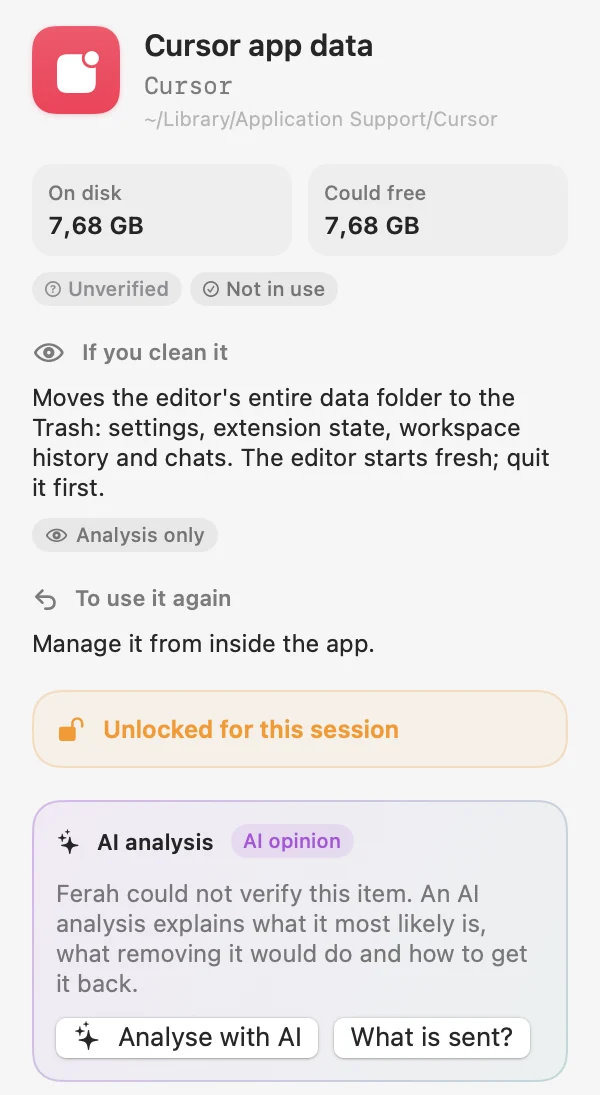
Unverified
Ferah cannot prove what it is, so it only shows it. You can unlock one item at a time.
App data · unknown caches

How it works
Five steps. No surprises.
- 1
Scan
Read-only. Ferah measures without changing anything, and scanning never uses the network.
- 2
Understand
Each item says what it is, who uses it, what happens if you clean it and how to get it back.
- 3
Choose
Only items that rebuild themselves can be pre-selected. Projects you mark as active stay out.
- 4
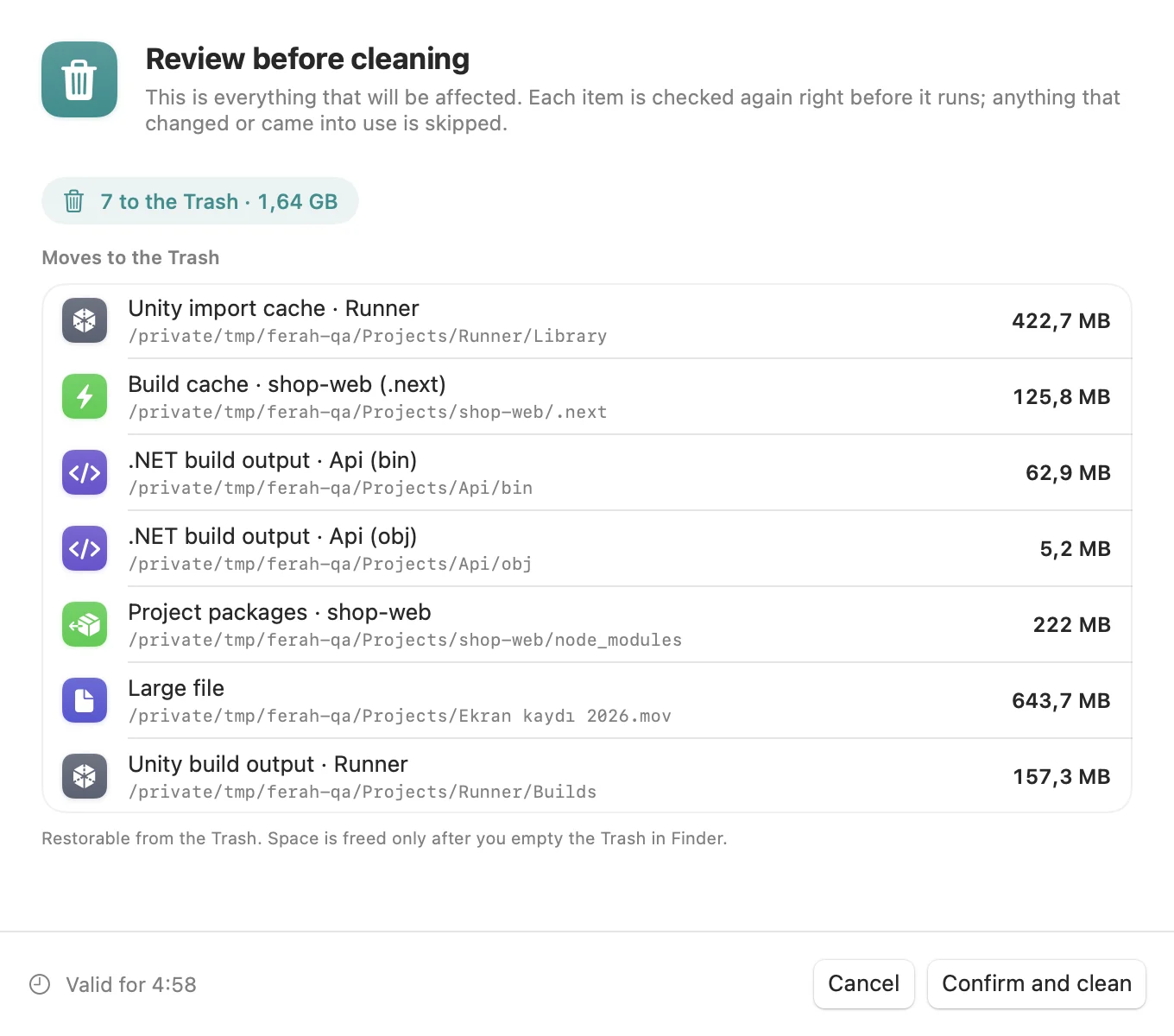
Review and confirm
You see every path before anything moves. Each item is checked again right before it runs.
- 5
Put back
Changed your mind? Restore from History or from the Trash.
Safety
Built not to break your Mac.
A cleaner removes things, so Ferah's safety rules live in its engine, not in a settings screen, and they are covered by tests.
Trash only
Files go to the Trash. Ferah has no permanent delete and no “Empty Trash” button.
Re-checked before every move
Same path, same file, no symlinks, not in use. Anything that changed since the scan is skipped and reported.
Knows what is running
Xcode, Unity, Docker or a dev server using a folder? It stays locked until you close it.
Protected by design
System folders, your home folder, Keychains, SSH keys, Photos, Mail, iCloud Drive and source code are never targets.
Careful with Docker
Docker.raw, containers and volumes are never touched. Images are removed one by one, only when unused.
Private
File contents are never read. No account, no analytics, no tracking.
Optional AI analysis
Not sure what something is? Ask.
For items Ferah cannot verify, an AI analysis explains in plain words what it most likely is, what removing it would do and how to get it back.
- Off until you turn it on. It runs only when you press the button on one item.
- Sends metadata only: path, size, dates and names of known folders. Never file contents. You can see exactly what is sent.
- Shown as an opinion. It can never change what Ferah allows.
- No account. 10 free analyses every month on each Mac.
Pricing
Free. Really.
Scanning and cleaning are free, with no limits, ads or upgrade screens. You pay only if you want more AI analyses than the free monthly ones.
Ferah
$0 forever
- Full scan and cleanup
- Developer tools in depth
- History and put back
- Automatic, signed updates
- 10 AI analyses every month
50 AI analyses
$2.99 one-time
- No subscription
- Use on up to 3 Macs
- A credit is used only on a successful answer
- Bought inside Ferah
Coming soon
200 AI analyses
$7.99 one-time
- No subscription
- Use on up to 3 Macs
- A credit is used only on a successful answer
- Bought inside Ferah
Coming soon
AI packs are sold by Lemon Squeezy, our merchant of record. Prices in US dollars; local taxes may apply.
FAQ
Questions, answered.
Is Ferah really free?
Yes. Scanning and cleaning are free with no limits, ads or subscription. Only AI analyses beyond the 10 free ones each month are paid, as one-time packs.
I'm not technical. Can I use Ferah?
Yes. Ferah explains every item in plain words, only pre-selects things that rebuild themselves and asks before anything moves. Everything goes to the Trash, so you can put it back.
I build apps with AI tools. Will Ferah break my projects?
No. Ferah checks that a folder really belongs to a project before suggesting it, never targets source code, and keeps a project's caches locked while its editor or dev server is running. You review the full list before anything moves.
Can Ferah delete something important?
Ferah only moves items you selected, after you have reviewed the full list, and it moves them to the Trash, so you can put them back. Items that might be your own work are never selected for you, and system folders, source code and personal libraries are protected by the engine.
Why doesn't my free space change right after cleaning?
Cleaned items go to the Trash first. The space is freed when you empty the Trash in Finder. Ferah never empties it for you.
Does Ferah upload my files?
No. Scanning and cleaning happen entirely on your Mac and never use the network. Only the optional AI analysis sends one item's metadata, never its contents, and only when you press the button.
Does Ferah need Full Disk Access?
No. It works without special permissions. Full Disk Access is optional and only needed to measure iPhone backups and some system caches.
Is it safe to use with Docker?
Ferah shows the real size of Docker.raw and can remove the build cache and images no container uses, after you confirm. It never touches Docker.raw, containers or volumes.
What do I need to run it?
macOS 14 Sonoma or later, on Apple Silicon or Intel. The download is small and notarized by Apple.
How is Ferah different from other Mac cleaners?
There is no one-click “clean everything”, no alarming numbers and no subscription. Ferah tells you what each item is and what happens if you remove it, knows developer tools in depth, and leaves every decision to you.
How do updates work?
Ferah checks for updates and asks before installing one. Updates are signed, so only builds published by us are accepted.
How do I uninstall Ferah?
Quit Ferah and drag it from Applications to the Trash. To also remove its settings and history, delete the folder ~/Library/Application Support/Ferah.

Make room on your Mac, without the guesswork.
Download Ferah, run a scan and see where your space went. Nothing changes until you say so.
Ferah is a Mac app. Open this page on your Mac to download it.
macOS 14 Sonoma or later · Apple Silicon and Intel · Notarized by Apple